ConstraintLayout with its own shadow and we will apply round corners around it just like CardView
Few Good things:
- No need to put
ConstraintLayoutinsideCardViewanymore - You can draw custom shadows as well
- Use same technique with any view
Prequisites (Good if you know these things otherwise don’t worry):
Canvasx,y corrdinatePorterDuffXfermodePaintclassPathclass
Things we need to do
- Draw shadow
- Draw a border around the view
- Clip the view with RoundRorners
- Fill your view with white color: so you can see the border & shadow & you must draw this over your shadow paint
Draw shadow around your view
Classes required
Paint: to paint with shadow colorPath: To give a path to shadow and that is around the view like a RECTANGLE
ShadowConstraintLayout.kt
class ShadowConstraintLayout : ConstraintLayout ......{

val shadowPaint = Paint()
val shadowPath = Path()
val porterDuffXfermode = PorterDuffXfermode(PorterDuff.Mode.SRC)
val blurRadius = 50f
val blurMaskFilter = BlurMaskFilter(blurRadius, BlurMaskFilter.Blur.NORMAL)

private fun drawShadow(canvas: Canvas) {
        canvas.save()
        //setup paint
        shadowPaint.isAntiAlias = true
        shadowPaint.style = Paint.Style.STROKE
        shadowPaint.color = shadowColor
        shadowPaint.strokeWidth = shadowStrokeWidth
        shadowPaint.xfermode = porterDuffXfermode
        shadowPaint.maskFilter = blurMaskFilter

        //setup path
        shadowPath.reset()
        shadowPath.moveTo((width + (shadowEndOffset)), shadowStartY + shadowTopOffset)               //Top Right
        shadowPath.lineTo((shadowStartOffset), shadowStartY+shadowTopOffset)                         // TR -> TL
        shadowPath.lineTo((shadowStartOffset), (height + shadowBottomOffset))                           // TL -> BL
        shadowPath.lineTo((width + shadowEndOffset), (height + shadowBottomOffset))                   // BL -> BR
        shadowPath.lineTo((width + shadowEndOffset), shadowStartY)                                      // BR -> TR

        canvas.drawPath(shadowPath, shadowPaint)
        canvas.restore()
    }
}
val porterDuffXfermode = PorterDuffXfermode(PorterDuff.Mode.SRC)
val blurMaskFilter = BlurMaskFilter(blurRadius, BlurMaskFilter.Blur.NORMAL)
shadowPaint.xfermode = porterDuffXfermode
shadowPaint.maskFilter = blurMaskFilterThe shadow is blurry that’s why we have used blurMaskFilter. And blurMaskFilter will only blur your color The shadow should not overlap the content of your constraint layout that’s why we used PorterDuffXfermode
Now we setting up paint is completed. We have to give it a path and that’s a rectangle
So the we are going to write something like this.
- Goto to start point
- Make a rectangle from there and at last come back from where you started
- shadowPath.goToStartPosition()
- shadowPath.move_to_top_left_from_top_right
- shadowPath.move_to_bottom_left_from_top_left
- shadowPath.move_to_bottom_right_from_bottom_left
- shadowPath.move_to_top_right_from_bottom_right
"->" denotes : From

shadowPath.moveTo(width, 0f)                    //Top Right
shadowPath.lineTo(0, 0)                         // TR -> TL
shadowPath.lineTo(0,height)                     // TL -> BL
shadowPath.lineTo(width,height)                 // BL -> BR
shadowPath.lineTo(width, shadowStartY)          // BR -> TR
Cool the paint and path are set. We just need to pass commands to draw it on canvas
canvas.drawPath(shadowPath, shadowPaint)That’s it.. This is what you will see

Rectangular shadow
The toughest part is done, now only comes the easy part
Draw a border around the view
ShadowConstraintLayout.kt
class ShadowConstraintLayout:ConstraintLayout {
....
    var borderPaint = Paint()
    var borderRectF = RectF()
    private fun drawBorder(canvas: Canvas) {
        //setup paint
        val borderColor = ContextCompat.getColor(context, R.color.borderColor)

        borderPaint.style = Paint.Style.STROKE
        borderPaint.color = borderColor
        borderPaint.strokeWidth = 0.5f

        //provide a rect
        borderRectF.top = height - borderHeight
        borderRectF.left = 0f
        borderRectF.right = width.toFloat()
        borderRectF.bottom = height.toFloat()
        canvas.drawRoundRect(borderRectF, cornerRadius, cornerRadius, borderPaint)
    }
}
We are using canvas.drawRoundRect(rect,paint) to draw. It requires a Rect and paint and we have provided both
Clip the view with RoundRorners
ShadowConstraintLayout.kt
class ShadowConstraintLayout:ConstraintLayout {
....
    var clipPath = Path()
    var clipRectF = RectF()
    private fun clipRoundCorners(canvas: Canvas) {
        clipPath.reset()

        clipRectF.top = 0f
        clipRectF.left = 0f
        clipRectF.right = canvas.width.toFloat()
        clipRectF.bottom = canvas.height.toFloat()
        clipPath.addRoundRect(clipRectF, cornerRadius, cornerRadius, Path.Direction.CW)

        canvas.clipPath(clipPath)
    }
}
At the end we doing
canvas.clipPath(clipPath)This means we want to clip this part(defined via clipPath) of canvas. And out future drawing commands must happen within the bounds of this clipPath
In real app we will do something like this
class MyLayout:View {
  fun override fun dispatchDraw(canvas: Canvas) {
    clipRoundCorners(canvas)
    super.dispatchDraw(canvas)
}
Our job is to draw round corners around our view and also ensure your child views should not be drawn on that area. So we should write this function inside dispatchDraw. We can change the canvas before a child is drawn : https://developer.android.com/reference/android/view/ViewGroup.html#dispatchDraw(android.graphics.Canvas)
Fill your view with white color
ShadowConstraintLayout.kt
class ShadowConstraintLayout: ConstraintLayout {

   val rectPaint = Paint()
   val rectBackgroundPath = Path()
   val porterDuffXfermode = PorterDuffXfermode(PorterDuff.Mode.SRC)

   private fun drawRectBackground(canvas: Canvas) {

        rectPaint.style = Paint.Style.FILL
        rectPaint.color = Color.WHITE
        rectPaint.xfermode = porterDuffXfermode

        rectBackgroundRectF.top = 0f
        rectBackgroundRectF.left = 0f
        rectBackgroundRectF.right = width.toFloat()
        rectBackgroundRectF.bottom = height.toFloat()
        rectBackgroundPath.reset()
        rectBackgroundPath.addRect(rectBackgroundRectF, Path.Direction.CW)

        canvas.drawRoundRect(rectBackgroundRectF, cornerRadius, cornerRadius, rectPaint)
    }
}
Code should look pretty straight forward.
canvas.drawRoundRect(rectBackgroundRectF, cornerRadius, cornerRadius, rectPaint)The paint object has rectPaint.xfermode = porterDuffXfermode, to ensure the paint should come on top of shadow
Final code should be like this
class MyLayout:View {
    override fun dispatchDraw(canvas: Canvas) {
       clipRoundCorners(canvas)
       super.dispatchDraw(canvas)
    }
    override fun onDraw(canvas: Canvas){
       drawShadow(canvas)
       drawBorder(canvas)
       drawRectBackground(canvas)
       super.onDraw(canvas)
    }
}
Full source code:
ShadowConstraintLayout.kt
class ShadowConstraintLayout : ConstraintLayout {

    private var borderPaint = Paint()
    private var rectPaint = Paint()
    private var shadowPaint = Paint()

    private var shadowPath = Path()
    protected var clipPath = Path()
    private var rectBackgroundPath = Path()

    protected var clipRectF = RectF()
    private var rectBackgroundRectF = RectF()
    private var borderRectF = RectF()

    private val porterDuffXfermode = PorterDuffXfermode(PorterDuff.Mode.SRC)

    private var shadowColor = Color.BLACK

    private var shadowStrokeWidth = 15f

    protected var blurRadius = 50f
    private var cornerRadius = 8f
    private var shadowStartOffset = 0f
    private var shadowEndOffset = 0f
    private var shadowTopOffset = 0f
    private var shadowBottomOffset = 0f
    private var shadowStartY = java.lang.Float.MIN_VALUE
    private var enableShadow = false
    private var enableBorder = false
    private var borderHeight = 0f
    private lateinit var blurMaskFilter: BlurMaskFilter

    constructor(context: Context, attrs: AttributeSet?) : super(context, attrs) {
        init(attrs)
    }

    constructor(context: Context, attrs: AttributeSet?, defStyleAttr: Int) : super(
            context,
            attrs,
            defStyleAttr
    ) {
        init(attrs)
    }

    constructor(context: Context) : super(context) {
        init(null)
    }

    fun init(attrs: AttributeSet?) {
        readAttrs(attrs)
        blurMaskFilter = BlurMaskFilter(blurRadius, BlurMaskFilter.Blur.NORMAL)
    }

    open fun readAttrs(attrs: AttributeSet?) {
        if (attrs != null) {
            val typedArray =
                    context.theme.obtainStyledAttributes(attrs, R.styleable.ShadowConstraintLayout, 0, 0)
            shadowTopOffset = typedArray.getDimension(R.styleable.ShadowConstraintLayout_shadowTopOffset, dpToPx(context, 0))
            shadowBottomOffset = typedArray.getDimension(R.styleable.ShadowConstraintLayout_shadowBottomOffset, dpToPx(context, 0))
            shadowStartOffset = typedArray.getDimension(R.styleable.ShadowConstraintLayout_shadowStartOffset, dpToPx(context, 0))
            shadowEndOffset = typedArray.getDimension(R.styleable.ShadowConstraintLayout_shadowEndOffset, dpToPx(context, 0))
            shadowStartY = typedArray.getDimension(
                    R.styleable.ShadowConstraintLayout_shadowStartY,
                    java.lang.Float.MIN_VALUE
            )
            shadowColor = typedArray.getColor(R.styleable.ShadowConstraintLayout_shadowColor, Color.BLACK)
            shadowStrokeWidth =
                    typedArray.getDimension(
                            R.styleable.ShadowConstraintLayout_shadowStrokeWidth,
                            dpToPx(context, 1)
                    )
            cornerRadius = typedArray.getDimension(
                    R.styleable.ShadowConstraintLayout_cornerRadius,
                    dpToPx(context, 3)
            )
            blurRadius =
                    typedArray.getDimension(R.styleable.ShadowConstraintLayout_blurRadius, dpToPx(context, 8))
            enableShadow = typedArray.getBoolean(R.styleable.ShadowConstraintLayout_enableShadow, true)
            enableBorder = typedArray.getBoolean(R.styleable.ShadowConstraintLayout_enableBorder, false)
            borderHeight = typedArray.getDimension(R.styleable.ShadowConstraintLayout_borderHeight, 0f)
            typedArray.recycle()
        }
    }

    override fun dispatchDraw(canvas: Canvas) {
        clipPath.reset()

        clipRectF.top = 0f
        clipRectF.left = 0f
        clipRectF.right = canvas.width.toFloat()
        clipRectF.bottom = canvas.height.toFloat()
        clipPath.addRoundRect(clipRectF, cornerRadius, cornerRadius, Path.Direction.CW)

        canvas.clipPath(clipPath)
        super.dispatchDraw(canvas)
    }

    override fun onDraw(canvas: Canvas) {
        if (enableShadow) {
            drawShadow(canvas)
        }
        drawRectBackground(canvas)
        if (enableBorder) {
            drawBorder(canvas)
        }
        super.onDraw(canvas)
    }

    private fun drawBorder(canvas: Canvas) {

        val borderColor = ContextCompat.getColor(context, R.color.borderColor)

        borderPaint.style = Paint.Style.STROKE
        borderPaint.color = borderColor
        borderPaint.strokeWidth = 0.5f

        borderRectF.top = height - borderHeight
        borderRectF.left = 0f
        borderRectF.right = width.toFloat()
        borderRectF.bottom = height.toFloat()
        canvas.drawRoundRect(borderRectF, cornerRadius, cornerRadius, borderPaint)
    }


    private fun drawRectBackground(canvas: Canvas) {

        rectPaint.style = Paint.Style.FILL
        rectPaint.color = Color.WHITE
        rectPaint.xfermode = porterDuffXfermode
        rectBackgroundRectF.top = 0f
        rectBackgroundRectF.left = 0f
        rectBackgroundRectF.right = width.toFloat()
        rectBackgroundRectF.bottom = height.toFloat()
        rectBackgroundPath.reset()
        rectBackgroundPath.addRect(rectBackgroundRectF, Path.Direction.CW)
        canvas.drawRoundRect(rectBackgroundRectF, cornerRadius, cornerRadius, rectPaint)
    }

    private fun drawShadow(canvas: Canvas) {
        canvas.save()
        shadowPaint.isAntiAlias = true
        shadowPaint.style = Paint.Style.STROKE
        shadowPaint.color = shadowColor
        shadowPaint.strokeWidth = shadowStrokeWidth
        shadowPaint.xfermode = porterDuffXfermode

        shadowPaint.maskFilter = blurMaskFilter

        shadowTopOffset = dpToPx(6)
        shadowBottomOffset = dpToPx(-2)
        shadowStartOffset = dpToPx(2)
        shadowEndOffset = dpToPx(-2)

        shadowPath.reset()
        shadowPath.moveTo((width + (shadowEndOffset)), shadowStartY + shadowTopOffset)               //Top Right
        shadowPath.lineTo((shadowStartOffset), shadowStartY+shadowTopOffset)                         // TR -> TL
        shadowPath.lineTo((shadowStartOffset), (height + shadowBottomOffset))                           // TL -> BL
        shadowPath.lineTo((width + shadowEndOffset), (height + shadowBottomOffset))                   // BL -> BR
        shadowPath.lineTo((width + shadowEndOffset), shadowStartY + shadowTopOffset)                  // BR -> TR

        canvas.drawPath(shadowPath, shadowPaint)
        canvas.restore()
    }

    fun dpToPx(context: Context, dp: Int): Float {
        return dp * (context.resources.displayMetrics.densityDpi / DisplayMetrics.DENSITY_DEFAULT).toFloat()
    }
}
activity_layout.xml
    <FrameLayout
        xmlns:android="http://schemas.android.com/apk/res/android"
        xmlns:app="http://schemas.android.com/apk/res-auto"
        android:layout_margin="10dp"
        android:orientation="horizontal"
        android:layout_width="match_parent"
        android:clipChildren="false"
        android:clipToPadding="false"
        android:layout_height="wrap_content">
            <ShadowConstraintLayout
              android:gravity="center"
              android:layout_width="100dp"
              android:layout_height="100dp"
              android:background="@color/white"
              app:blurRadius="8dp"
              app:shadowStartY="0dp">
        </ShadowConstraintLayout>
</FrameLayout>
attrs.xml
<?xml version="1.0" encoding="utf-8"?>
<resources>
    <declare-styleable name="ShadowConstraintLayout">
        <attr name="shadowTopOffset" format="dimension"/>
        <attr name="shadowBottomOffset" format="dimension"/>
        <attr name="shadowStartOffset" format="dimension"/>
        <attr name="shadowEndOffset" format="dimension"/>
        <attr name="shadowStartY" format="dimension"/>
        <attr name="shadowColor" format="color"/>
        <attr name="shadowStrokeWidth" format="dimension"/>
        <attr name="cornerRadius" format="dimension"/>
        <attr name="blurRadius" format="dimension"/>
        <attr name="enableShadow" format="boolean"/>
        <attr name="enableBorder" format="boolean"/>
        <attr name="borderHeight" format="dimension"/>
    </declare-styleable>
</resources>
Full code snipet and how to use
1 very importatnt thing you have to do this in your parent view
android:clipChildren="false"
android:clipToPadding="false"
From these two commands we are telling the Android that parent view must not clip the views of ShadowConstraintLayot if the views are getting drawn outside of its bouds.
This is the final result..
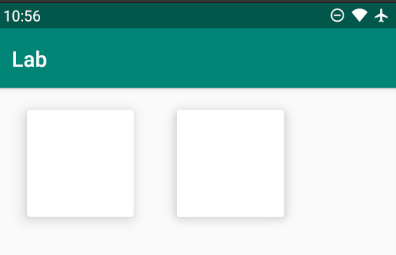
Left one is Card View & Right one is ShadowConstraintLayout
You can play with blurRadius property and also set shadow top,bottom,start,end offset to suit your needs.